Pelicano ANATEL - English
Versão 1.0 - 09/2025
INTRODUCTION
This manual aims to instruct the user on the operation of the Pelicano ANATEL RPAS (Remotely Piloted Aircraft System), manufactured by SkyDrones and carrying the Colibrex payload. This manual covers appropriate usage procedures for the equipment, is an integral part of the solution, and should be kept for future reference.
The Pelicano ANATEL was developed as part of the SkyDrones Solutions line, with the focus of carrying special sensors for radio frequency surveys.
DESCRIPTION
The Pelicano ANATEL is a four-motor remotely piloted aerial system. Its onboard electronics, sensors, and control system stabilize the equipment, allowing for rapid learning, even for inexperienced pilots.
Advantages
The Pelicano ANATEL offers a set of technological advantages that optimize its performance, such as:
- Automatic flight altitude stabilization and locking.
- Automatic return-to-base command;
- Robust equipment with high load capacity.
- Compact, foldable. Carbon fiber structure and electric propulsion.
- Highly customizable - can be easily adapted for different operations.
Pelicano ANATEL Technical Data
The Pelicano ANATEL is equipped with:
- 4 electric motors;
- Composite chassis (Carbon fiber and aluminum);
- MEMS gyroscopes – 3 axes;
- Accelerometers – 3 axes;
- Magnetic sensor – 3 axes;
- 1 differential GNSS receiver (4 constellations);
- SkyDrones drawer system;
- Onboard 1080p camera with real-time transmission on a 3-axis gimbal;
- Radio control with built-in screen and operating system running the Pelicano ANATEL control application.
Technical specifications:
- Equipment weight (without battery and payload): 11 kg;
- Battery weight: 6.5 kg;
- Maximum Take-Off Weight (MTOW): 25 kg.
Operational characteristics:
- Flight time: up to 25 minutes (variable according to payload, battery used, and atmospheric conditions);
- Flight altitude: Up to 120 meters.
MAIN COMPONENTS
Arms
The four carbon fiber arms provide durability and lightness to the Pelicano ANATEL.
The four arms can be folded via a hinge on the equipment's central chassis, making it compact for transport.
The arms must be open and locked for takeoff and cleaning. If the operator takes off without locking an arm, the drone will quickly lose lift and crash.
To lock the arms, fully open the arm and turn the lock clockwise over the drone's elbow until it stops. Check the procedure in the image below:
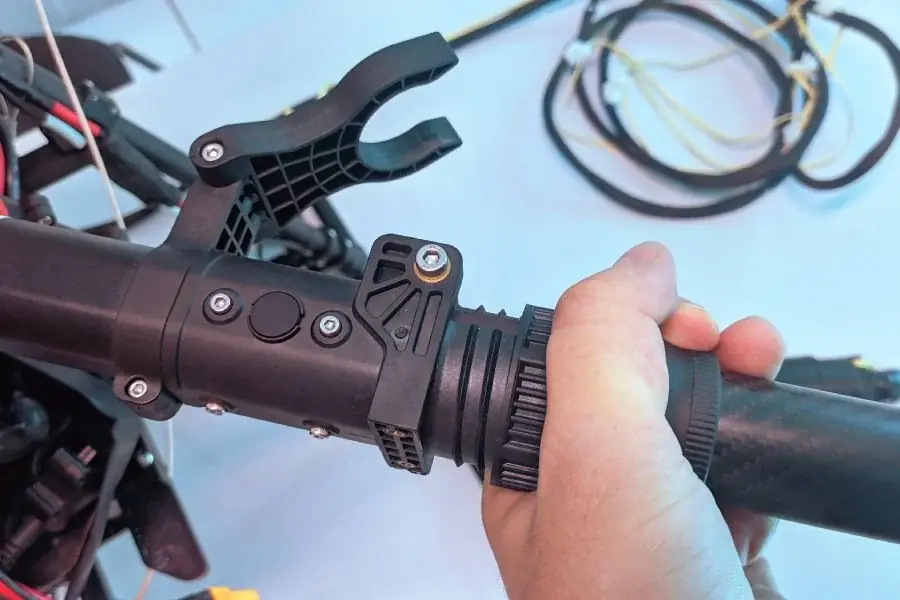
Lock near the drone's elbows
Central Chassis
The central chassis of the Pelicano ANATEL was developed from a highly resistant material to provide adequate space for the installation of electronic components and sensors, in addition to providing high strength and safety to the assembly (low weight and high rigidity).
SkyDrones Drawer System
Below the central chassis is the SkyDrones drawer system. Manufactured by default from polyacetal plastic and optionally from carbon fiber, the system is a universal solution for attaching different items to the drone. It allows compatibility of the same drone for various solutions.
The battery holder is attached to the upper part of the drawer system and can be removed to easily secure the battery in the holder.
At the bottom is the opening for connecting the desired equipment.
GNSS Receiver ("GPS")
The GNSS receiver module is located inside the RPAS and is connected to the pair of antennas located on the outside of the drone, one on the left and one on the right of the drone.
The GPS has an LED that communicates its status to the user and helps diagnose problems in the field. These warnings are replicated to the Pelicano ANATEL STATUS LED, located on the rear of the equipment's fairing. Below is a table for quick reference and identification by the operator:
| STATUS LED | Meaning |
|---|---|
| Flashing red and blue | Initializing sensors. Keep the drone still and stable while the GPS initializes the sensors. |
| Solid blue | GPS not found. |
| Flashing green | Disarmed (ready to arm), GPS locked. Quick double beep when disarmed. |
| Rapidly flashing green | Same as above, but GPS is using SBAS (thus has a better estimated position). |
| Solid green | With a single long beep: armed and GPS locked. Ready for flight! |
| Two yellow flashes | Failing pre-arm checks (system refuses to arm). |
| Single yellow flash | Radio failsafe activated. |
| Flashing yellow - with a rapid beep | Battery failsafe activated. |
| Flashing yellow and blue - with a high-high-high-low beep sequence (dah-dah-dah-doh) | GPS error or GPS failsafe activated. |
| Flashing red and yellow | EKF failure or "*Inertial Nav*" |
| Flashing purple and yellow | Barometer error. |
| Solid red | Error, usually caused by the SD card (re-insert or insert the SD card to resolve), MTD, or IMU. You can check the SD card and look at the *BOOT.txt* file to analyze boot messages. |
| Solid red with SOS beep sequence | Missing SD card or SD card format error. |
| No light when powered on | No firmware, firmware loss, missing SD card, or SD card format error (ac3.4 version or higher). |
Motors and propellers
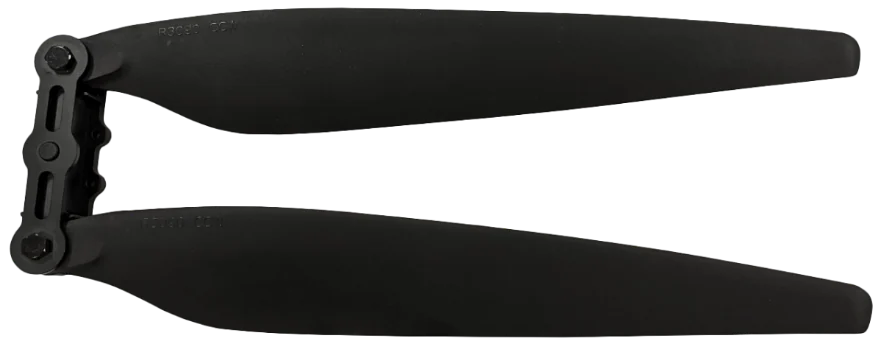
The four high-performance brushless electric motors with carbon fiber propellers ensure sufficient thrust for stable, safe, and long-duration flight. Each motor has a mount where a pair of propellers is fixed. The mount is attached to the motor using Allen-type screws.
The drone operates with 2 motors rotating clockwise (CW) and two rotating counter-clockwise (CCW). There are different propellers for each motor direction. The drone comes with 2 CW (clockwise) propellers and 2 CCW (counter-clockwise) propellers.
Propeller size: 30 inches (30x110). Model 3011.
Propellers of model 3090 (30x90) are also compatible with the drone.
Never use blades of different models on the same motor, such as a 3090 blade and a 3011 blade on motor M1.
Batteries
The Pelicano ANATEL uses a 12S high-discharge battery. Its lifespan is approximately 600 charge cycles if used and charged appropriately.
They must always be used with specific chargers for LiPo type batteries. For information on the charger that accompanies the equipment, please refer to its manual.
Identify which battery and charger were purchased and check the specific manual for these items in the links below:
Bateria Inteligente 12S - Tattu
WARNING: the battery may catch fire or explode if punctured or mishandled.
Radio control
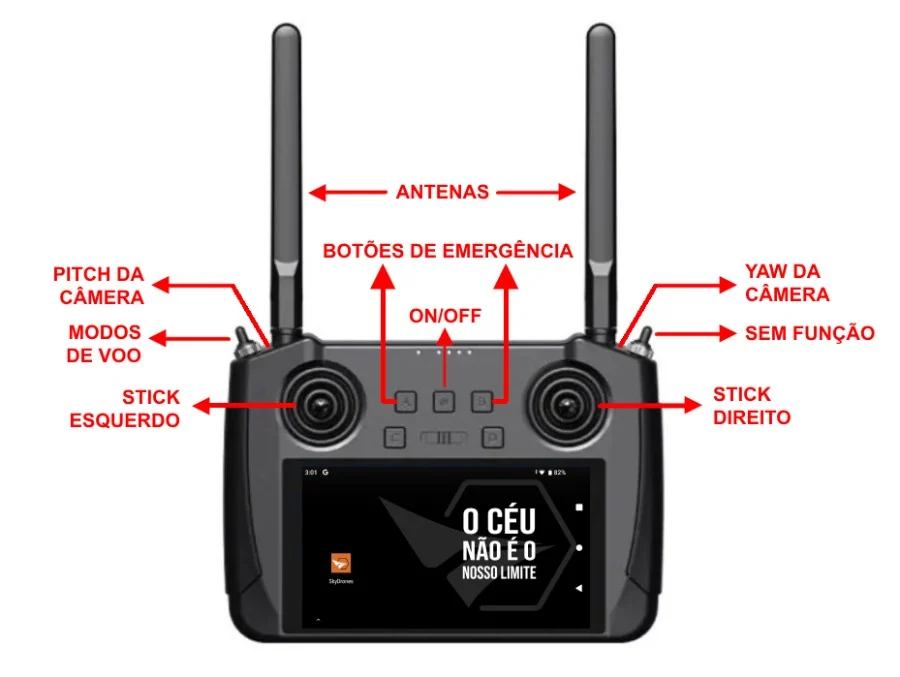
Pelicano ANATEL radio control
Main stick commands for the RPAS Radio Control:
Left Stick:
- Moving the left stick up and down changes the RPAS elevation. Moving it up ascends, and moving it down descends. When the stick is in the neutral position, the equipment will maintain its altitude.
- Moving the left stick left and right changes the RPAS rotation. Moving it left rotates the equipment counterclockwise; moving it right rotates the equipment clockwise.
Right Stick:
- Moving the right stick up and down moves the RPAS forward and backward. Moving it up moves the equipment forward, while moving it down moves the equipment backward.
- Moving the right stick left and right moves the RPAS left and right. Moving the stick left moves the equipment left, and moving the stick right moves the equipment right.
Top Switches:
The upper left switch ("Flight Mode Switch") has 3 positions:
- Backward: RTL Flight Mode.
- Middle: LOITER Flight Mode (manual).
- Forward: AUTOMATIC Flight Mode.
The upper right switch has 3 positions, but no function is configured.
Dial:
The upper left dial controls the camera's Pitch movement (up and down movements).
The upper right dial controls the camera's Yaw movement (side-to-side movements).
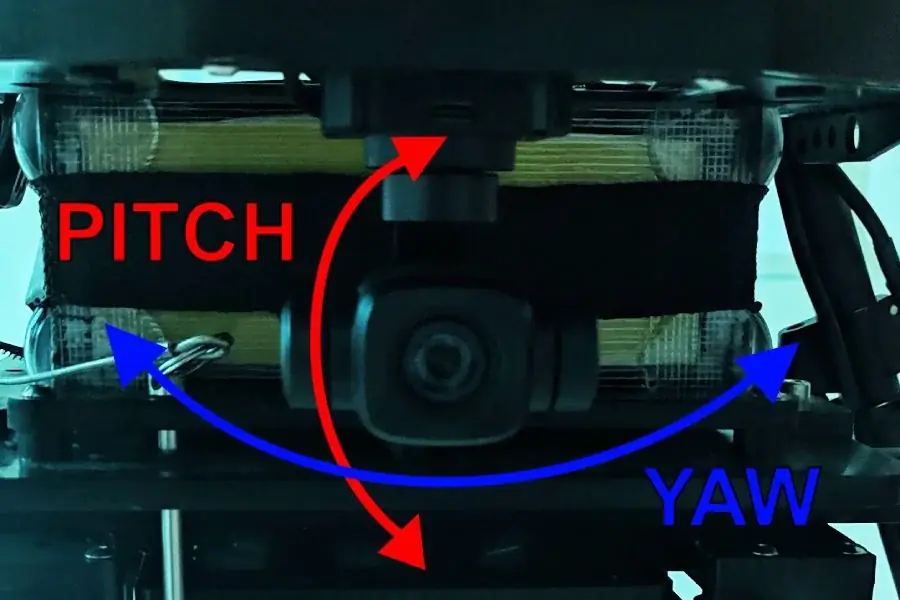
Gimbal Pitch and Yaw Movements
Front Buttons:
Buttons A, B, C, and D and the slider button in the center of the control do not have a specific function configured, except for simultaneously activating buttons A and B for emergency:
Emergency: By pressing buttons A and B simultaneously for 1.5 seconds on the remote control, the motors are instantly de-energized. This procedure should only be used when the drone's motors are already running and it is no higher than 0.5 meters from the ground, or in extreme emergency, as the propellers stop and the drone loses lift, causing immediate equipment crash.
To re-arm the drone after activating emergency mode, simply repeat the button activation.
OPERATION
Operational Limits
The operational limits of the Pelicano ANATEL include both climatic conditions and the RPAS's usage method. The drone should only be used within these conditions.
Climatic
- The RPAS should not be used if wind speed exceeds 12 m/s (43 km/h).
- The higher the wind speed, the shorter the battery duration.
- The drone should only be operated in environments with temperatures between 0°C and 40°C.
Operational
- The maximum takeoff weight is 25 kg
- Battery charging time is approximately 30 minutes, varying according to the charging mode on the charger and the electrical current.
- Flights will last up to 25 minutes.
- The maximum operating distance is approximately 1 km from the radio control, varying according to terrain configurations and obstacles between the drone and the operator.
- All flights must be conducted within visual line of sight (VLOS). Under no circumstances should the Pelicano ANATEL fly behind physical obstacles (houses, trees, hills, etc.), at the risk of losing the control and command link. In case of loss of this link, the drone will ascend to a predetermined altitude and return to its original takeoff location.
PRE-FLIGHT
Powering on the radio control
To power on the radio control, press the ON/OFF button once, then press and hold a second time until the radio starts. You will notice the screen will light up and load the operating system. You will see a background and an icon to open the SkyDrones application.
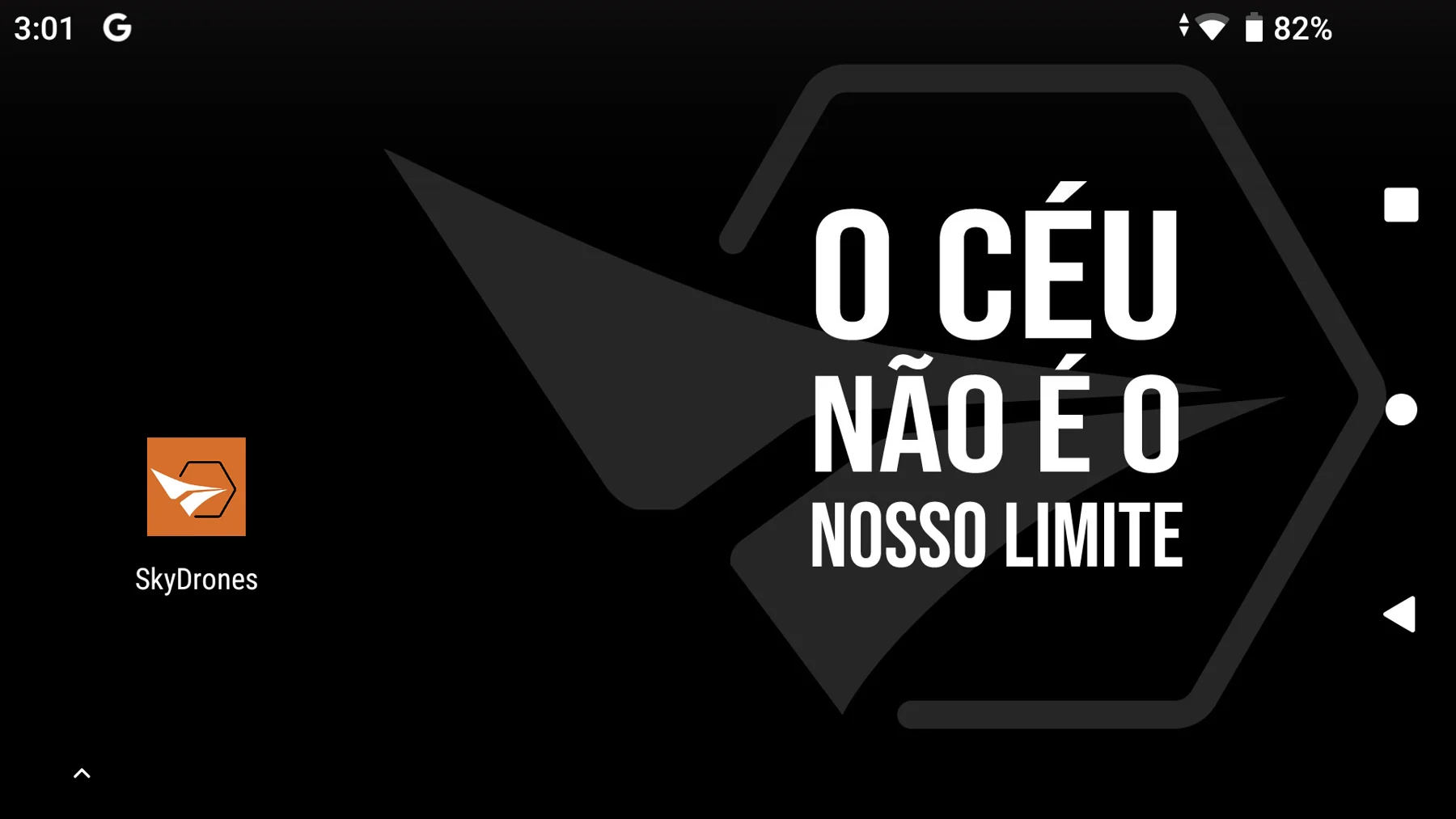
Pelicano ANATEL radio control home screen
To power off the radio control, press and hold the button for approximately 4 seconds and tap "Power off" on the screen.
Powering on the Drone
To power on the drone, connect the battery as per the instructions below and keep the equipment still for 10 to 20 seconds for automatic sensor calibration.
Follow the steps:
- Place the battery in the battery holder, securing the velcro straps and passing the strap over the battery to keep it safe.
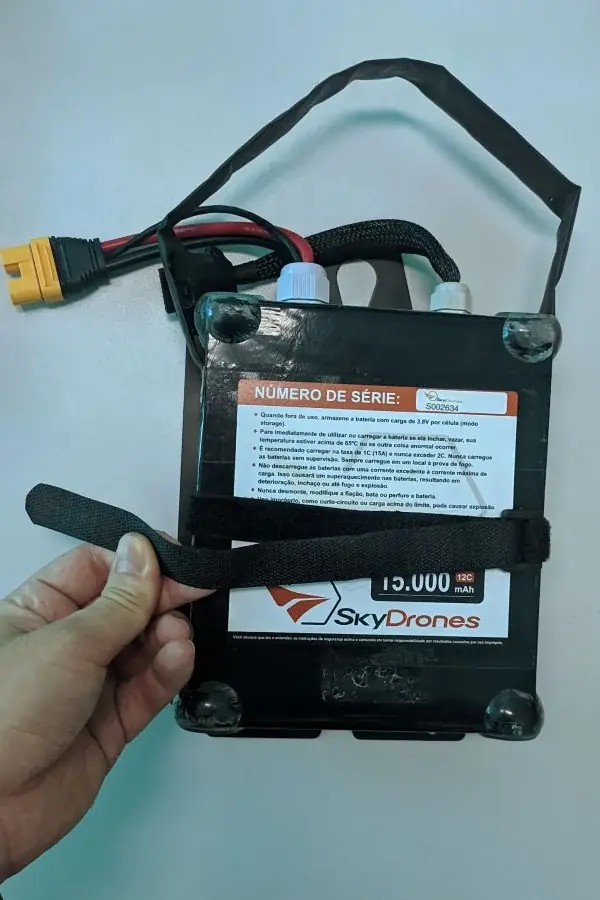
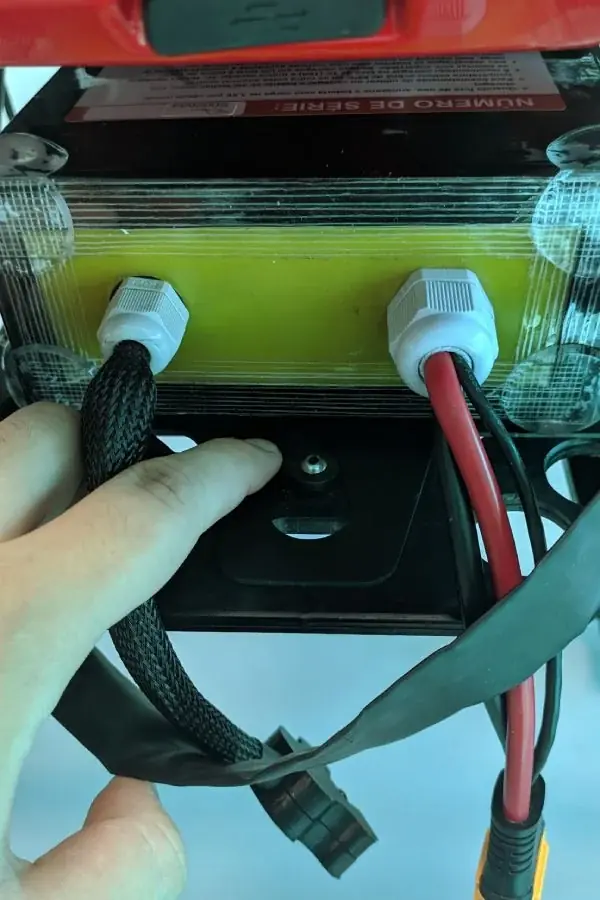
2. Place the battery holder with the battery in its designated location below the main fairing and turn the latch to secure the holder.
3. Connect the AS150U connector into the designated connector port located on the right leg.
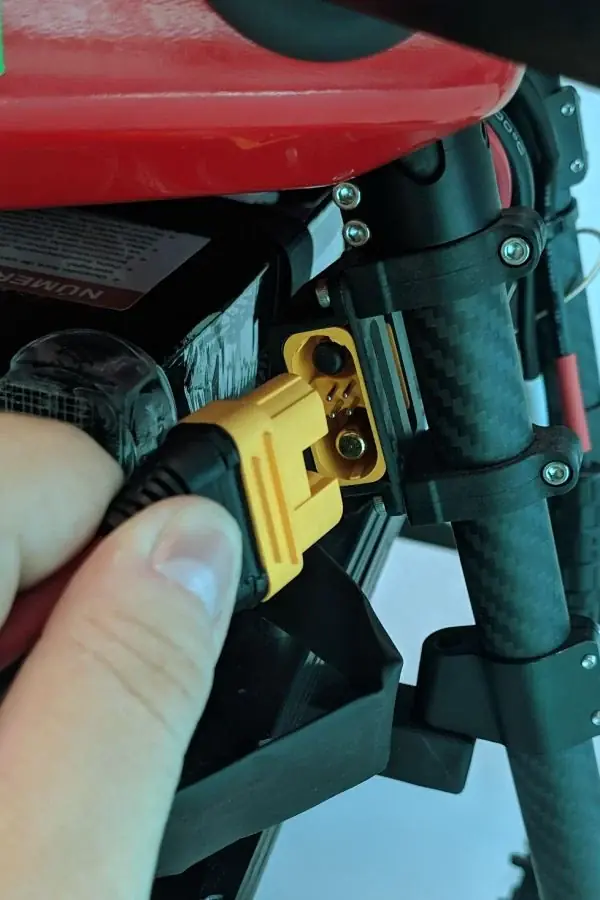
Ensure the connector is fully inserted! If it remains "loose," it could damage the connector or detach during flight.
- The drone will emit some beeps. Wait and do not move the equipment until it emits a long beep. After the long beep, it is ready for use.
To power off the RPAS, reverse the process by disconnecting the connector to remove the battery from the holder.
Compass Calibration
The equipment's compass is located inside the drone. This is an extremely important component for proper positioning and flight stabilization, and extra care must be taken as a compass calibration failure or problem could lead to a serious incident.
When to calibrate the compass:
- When the RPAS/app sends a compass error alert.
- When the RPAS, flying in LOITER mode, does not stabilize (stay in place) and starts flying in circles without the pilot giving commands on the remote control Sticks.
- When the drone will perform a flight more than 400 km away from the location where the last calibration was performed.
How to calibrate the compass:
- Ensure the equipment is in an open field and verify in the app that the GNSS receiver has a signal from at least 6 satellites. This signal is important for the drone's flight controller to load the correct electromagnetic values for its current location.
- Access the configuration menu in the SkyDrones application on the radio control and select configure magnetometer (compass). Press Start Calibration.
- Rotate the drone as shown in the image below until you receive confirmation of successful calibration. Ensure that the person(s) handling the RPAS are not carrying items that could interfere with magnetic calibration, such as common metal objects like smartphones, coins, belt buckles, watches, etc.
- After calibration is complete, it is necessary to power off and then power on the RPAS battery again so that it restarts with the new compass calibration value.
Arming the system
The Pelicano ANATEL system should only be armed during the takeoff process. To arm the equipment, the left stick of the Remote Control (elevation/rotation) must be positioned in the lower right corner.
When arming the system, the motors will start to spin, so ensure the arms are open and locked, and there is nothing around the drone.
Disarming the system
To disarm the equipment after landing, lower the left stick (elevation/rotation) until the motor rotation decreases, then position it in the lower left corner and wait until you hear a beep. Once you hear the beep, return the stick to its initial position.
FLIGHT OPERATION
Takeoff
- Position the drone in the field and lock the arms (as stated in the manual).
- On the radio control, select LOITER operating mode.
- Perform a final check of the launch area.
- Arm the system via the radio control.
Ensure there are no obstacles in the takeoff direction and that the space is sufficient and safe. A minimum distance of 30 meters is recommended.
Flight
- Maintain visual contact with the aircraft during flight (VLOS).
- In case of any abnormality that could compromise the drone, people, or other property, the pilot in command must abort the mission by activating the RTL (return to takeoff point) switch. The change in operating mode must be performed via the flight mode switch on the radio control.
- For the drone to stop the automatic mission at any time, the operator can activate LOITER mode on the flight mode switch.
- During automatic flight, the operator can adjust the drone's flight altitude without needing to change the flight mode, simply by slightly moving the left stick of the radio control up or down.
Landing and aircraft retrieval
Upon activating RTL flight mode or completing the automatic mission, the drone will return to the takeoff point and land automatically.
To perform a manual landing, slowly lower the left stick, and when the drone's landing gear is on the ground, fully lower the left stick to disarm the motors. The drone's motors will decelerate until they stop, as stated in the Disarming the system chapter.
After the Pelicano ANATEL returns to the ground, follow the procedures below:
- Disconnect the battery.
- Power off the radio control.
SAFETY
This chapter is a guide to basic safety and standard operating procedures recommended for using the Pelicano ANATEL. Its complete reading is essential and minimizes risks in RPAS operation.
All operations with the Pelicano ANATEL must comply with current ANAC regulations for Class 3 RPAS flights:
Regarding the system
- Familiarize yourself with the correct procedure for flight preparation and software operation.
- Perform the checks and training recommendations before each flight.
- Caution: The drone's propellers are made of carbon fiber and can be dangerous. Keep clear of the aircraft during landings and takeoffs. Risk of mutilation or death.
- Ensure your radio control and onboard battery are fully charged.
- Check that the radio control antennas are not damaged and are in the correct position, pointing upwards.
- Before use, observe the RPAS from all angles and ensure there are no misplaced or damaged parts, or any other abnormalities.
- Check that there is no dirt in the motor. Attempting to operate under these conditions can damage it and lead to in-flight failures resulting in an out-of-control RPAS, severe damage, or harm to the company or other people.
- Never turn off the radio control during flight.
- Remember: always turn on the radio control before connecting the aircraft battery, and always disconnect the aircraft battery before turning off your radio control.
Regarding the flight area
- Perform your first test flight in an open field, with little to no wind, and choose a location with short grass or from a tarpaulin fixed to the ground, to prevent dust and debris from entering the motors. Do not take off directly from dusty and dry locations.
- Ensure all spectators remain clear of the operating area, at least 30 m from the aircraft. No one should be visible in the takeoff direction. Pay special attention to children and animals.
- Conduct an area survey. Check for any unnoticed obstacles, such as power lines, overhead wires, and tree branches.
- Never use the drone near a controlled aerodrome or in controlled airspace.
- Always check weather conditions, wind speed, and direction with the aid of an anemometer. The drone should not be used in strong winds, turbulent conditions, extreme gusts, or approaching storms. Observe the RPAS operational limits.
- Keep the aircraft in sight throughout the entire flight duration (VLOS). If someone approaches the safety perimeter to talk or ask questions, avoid engaging in conversation and ask to speak after the RPAS has been retrieved.
- Check your flight perimeter.
- Your takeoff area should be open and flat, with short grass.
Regarding the flight
- Perform flights away from people or objects. Always check for children or animals nearby.
- Always have a mental flight plan and visualize the flight path, repeatedly checking for obstacles.
- Never conduct missions outside of direct line of sight and always keep your eyes fixed on the RPAS while it is airborne.
- Never use the RPAS near people - a minimum distance of 30 m is recommended between any people and the takeoff area.
- Never allow untrained individuals to pilot the RPAS.
- Never pilot the drone under the influence of alcohol or narcotics.
MAINTENANCE
All maintenance, assembly, and disassembly procedures must be performed by SkyDrones or by a qualified and designated technician.
Maintenance or modifications performed by customers or third parties not authorized by a SkyDrones spokesperson will result in the loss of the RPAS warranty.
The customer is responsible for maintaining the equipment in good working order and must perform periodic inspections on the RPAS, at least every 100 flights, to:
- Check the condition and integrity of all propellers and their screws;
- Check the motors for dirt ingress and/or rotation noise.
Check the document below for recommended safety checks for the equipment:
Motor Bearings
In case of vibration, noise, play, or abnormal temperature increase, the motor bearings must be replaced. Contact a SkyDrones technical assistance.
Cleaning and conservation
Due to the nature of its operation, it is natural for the equipment to be dirty after takeoff and landing on grass and open terrain, therefore it is extremely important to perform proper cleaning of the aircraft, according to the following instructions:
- The chassis, arms, motors, and landing gear can be washed with running water.
- Cleaning must be performed with the arms extended (they must not be folded), to prevent water from entering the hinge holes.
- Be very careful not to wet the camera/gimbal, as this item is not waterproof.
- Do not use any pressure washer equipment for cleaning.
- Clean the equipment before storing it
Handling
- For equipment transport, the RPAS must have its arms folded from the hinges near the chassis.
- For proper transport and storage, the propellers must be folded.
- It is also recommended that the geophysical equipment used be removed for transport and storage.
Storage
- The Pelicano ANATEL must be stored in a dry place with temperatures between 5ºC and 45ºC.
PILOT TRAINING
SkyDrones provides pilot training at its facility or through a qualified and approved company at the client's site. This training consists of theoretical and practical parts according to the client's needs.
FLIGHT SPECIFICATIONS
Flight time and distance
Pelicano ANATEL flight time according to its battery:
| Battery Specification | Number of Batteries in RPAS (Units) | Approximate Flight Range (Minutes) |
|---|---|---|
| 22.000 mAh 12S 44.4 v | 1 | Up to 25 minutes |
Flight speed
The average flight speed of the aircraft, relative to the ground, is approximately 6 m/s or 21 km/h. The speed may vary according to flight planning.
ATTACHMENTS
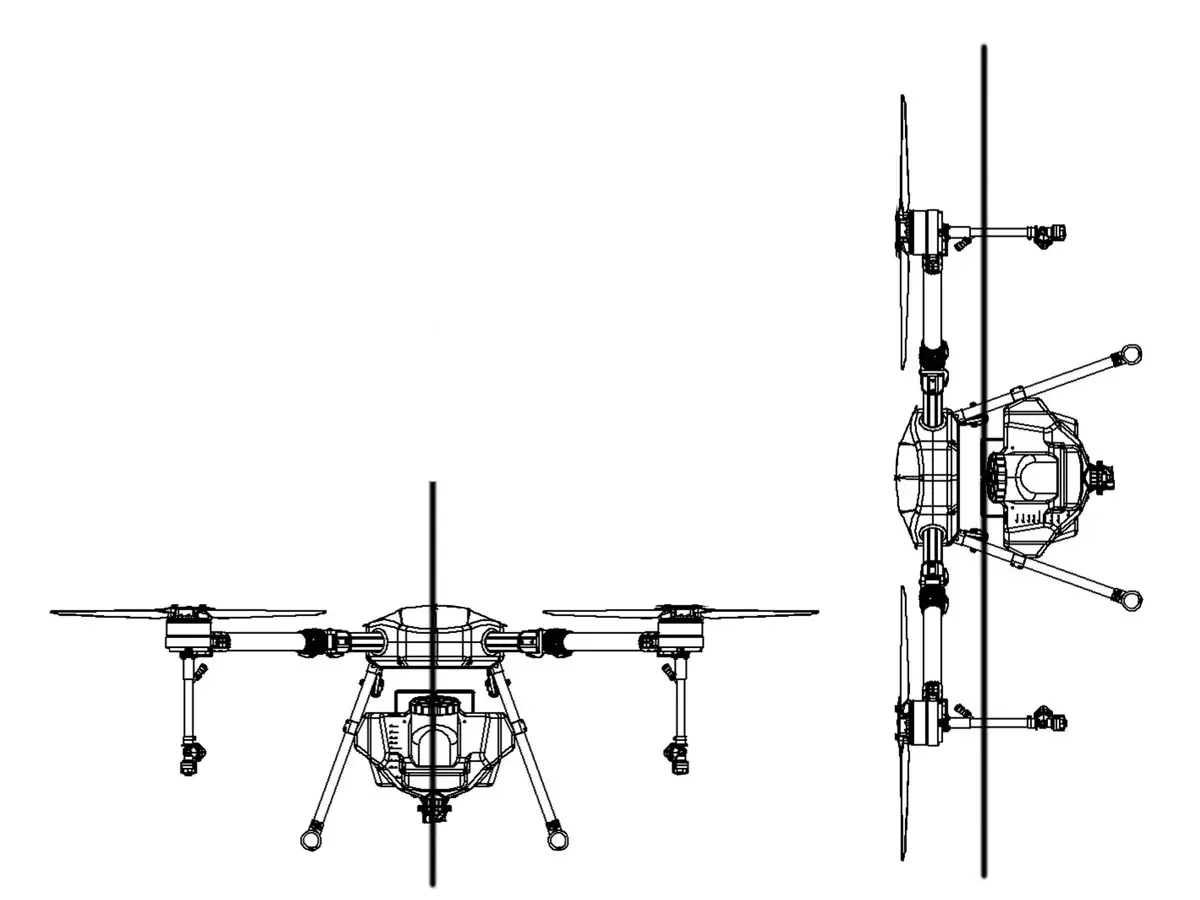
Annex I – Equipment Dimensions
| Pelicano ANATEL | |
|---|---|
| Dimensions | 140 cm x 140 cm x 60 cm (Arms open, without propellers) |
| Motor Diameter | 80 mm |
| Motor Wheelbase | 1393 mm |
| Weight (without battery) | 11 kg |